 Faber
GitHub
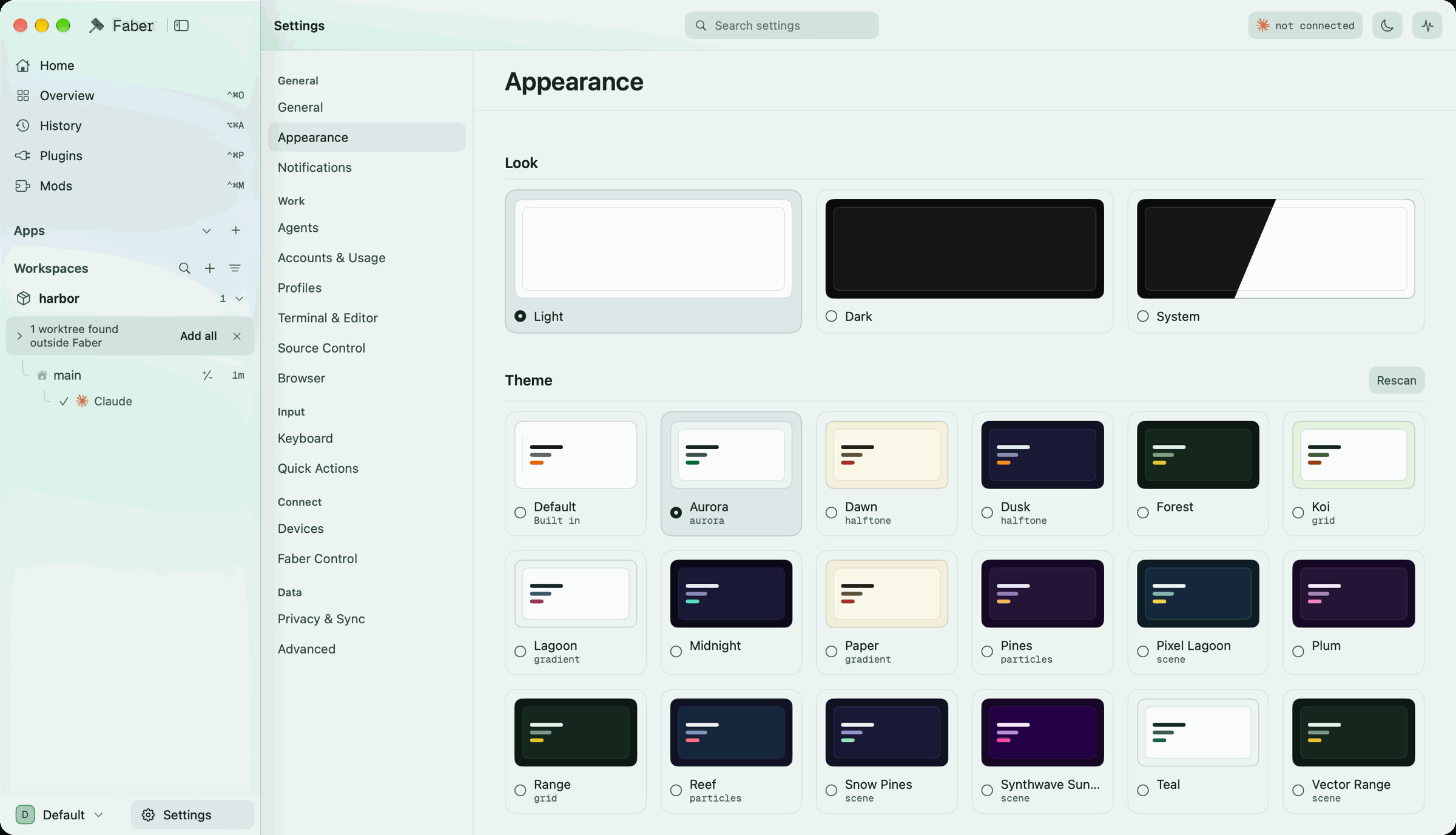
Settings and themes
Panes
| Group | Panes |
|---|---|
| General | General, Appearance, Notifications |
| Work | Agents, Accounts & Usage, Profiles, Terminal & Editor, Source Control, Browser |
| Input | Keyboard, Quick Actions |
| Connect | Devices, Faber Control |
| Data | Privacy & Sync, Advanced |
Settings has a search. Mods have their own page (Ctrl Cmd M).
Themes
A theme is JSON: color tokens, surface opacity and an optional animated backdrop (gradient, particles, grid, halftone, aurora or a layered scene). 17 themes ship with Faber. Settings, Appearance, Theme picks one everywhere or for the open workspace only.
/themelists themes,/theme <name>applies one and/theme <name> --projectkeeps it for the workspace.- Your own themes go in
<home>/themes/<id>.jsonand shadow a bundled one with the same id. - Faber guarantees legible text on translucent surfaces. Reduce Transparency and Increase Contrast make surfaces opaque, and Reduce Motion or Low Power Mode freeze backdrops.
- Agents can set themes through
faber themewith the Set themes permission.